Full Guide: How to Create AI-Native Video Calls
A practical, opinionated guide to building video calls where AI is a participant — not a notetaker. The four layers (media, voice loop, memory, action), the latency budget, the reference stack, and the hard problems most build posts skip.
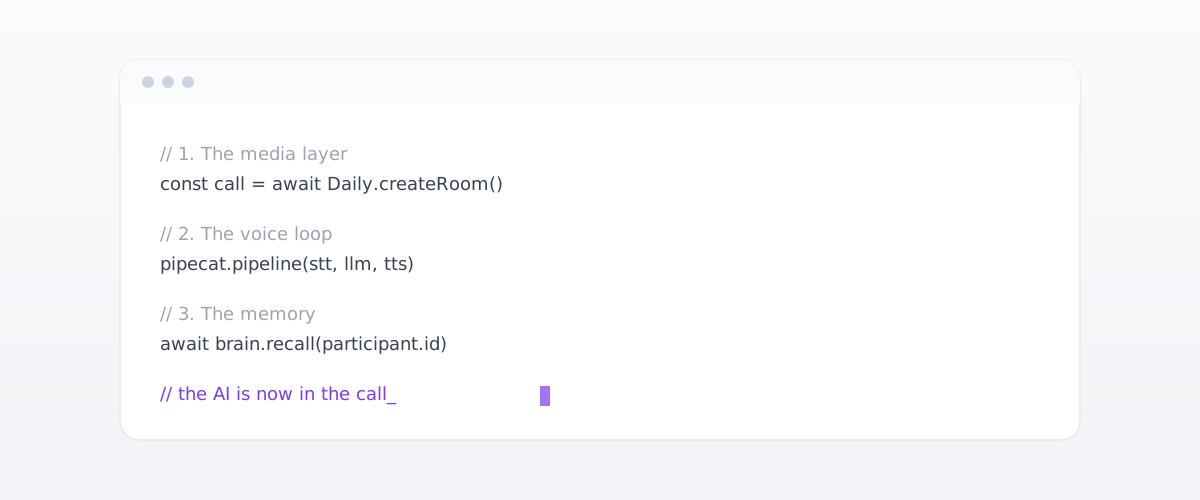
A practical guide. What it actually takes to put an AI inside a video call — written for builders, with the trade-offs and the parts that hurt.
Most "AI for video calls" tutorials show you how to send a transcript to an LLM after the call ends and call it done. That is not building an AI-native video call. That is building a notetaker. The thing this post is about is the harder version — the AI as a participant, speaking and listening in real time, seeing the shared screen, remembering the last call, acting after.
This is a build guide. It is opinionated. It assumes you have shipped real software before and that you would rather have one strong recommendation per layer than ten options to evaluate.
If you have not read the previous post in this series, it defines the category we are building toward. This one shows how to build it.
What you are actually building
There are four layers. You will build, glue, or buy each one. None of them is optional.
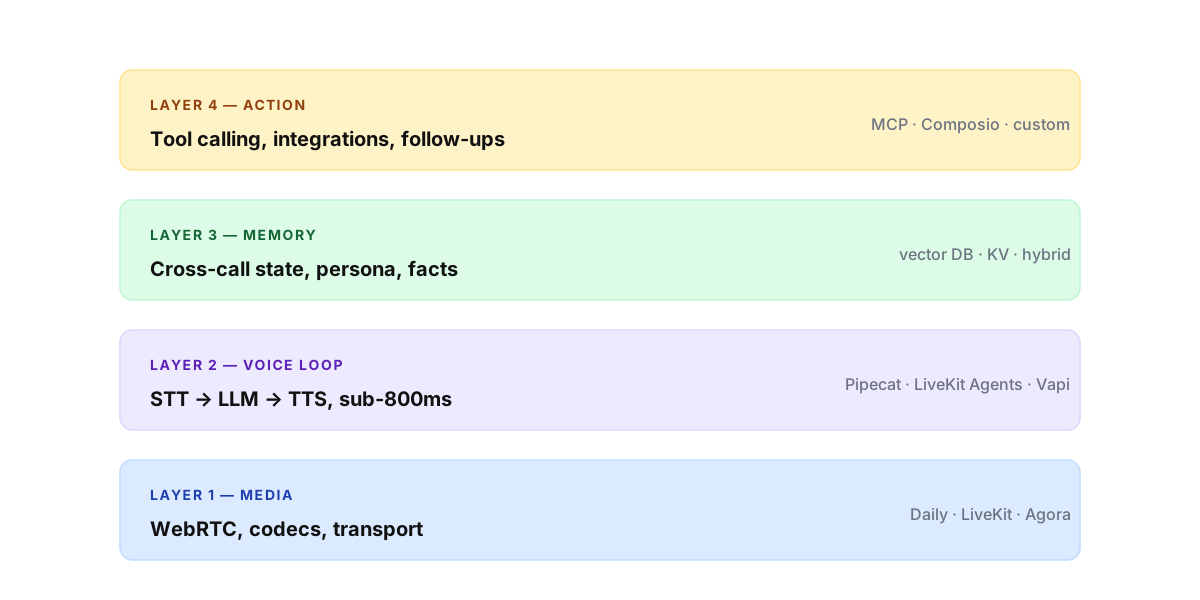
Layer 1 — Media. WebRTC. Audio and video moving between participants, including the AI as one of those participants. The physics layer — codecs, ICE, SFU, jitter buffers.
Layer 2 — Voice loop. The round trip that turns your speech into the AI's reply, in audio. Speech-to-text, then a language model, then text-to-speech. Sub-second or it feels broken.
Layer 3 — Memory. What the AI knows that did not come from this call. Cross-session state, the user's persona, what was promised three meetings ago.
Layer 4 — Action. What happens after the AI replies — tool calls, integrations, follow-ups, the CRM update that fires when the call ends.
A bolt-on tool is one that only does layer 4 — and pretends layers 1–3 do not exist. An AI-native build owns all four. Now let's walk each.
Layer 1: The media
Recommendation — do not write WebRTC from scratch.
That is the whole layer in one sentence. WebRTC is a 250-page spec held together with NAT traversal and historical baggage. Browsers have inconsistent implementations. Networks behave differently across continents. Mobile devices burn batteries differently. You will spend six months reinventing what an SFU vendor sells for fifty dollars a month.
The three to evaluate, in order:
- Daily.co. What we use at Waterr. JavaScript and Python SDKs, sane defaults, generous free tier, well-documented bot API for joining a call as a participant. Best for getting to production in a week.
- LiveKit. Open source, self-hostable, big agents framework (LiveKit Agents) that bundles the voice loop too. Pick this if data residency or self-hosting is non-negotiable.
- Agora. The enterprise default. Better for large-scale broadcasts than for AI participants. Worth knowing exists; rarely the right pick for AI-native.
The decision tree is short. Data residency requirement? LiveKit. Everything else? Daily. Want lock-in with someone's enterprise team? Agora.
Layer 2: The voice loop
This is the hard layer.
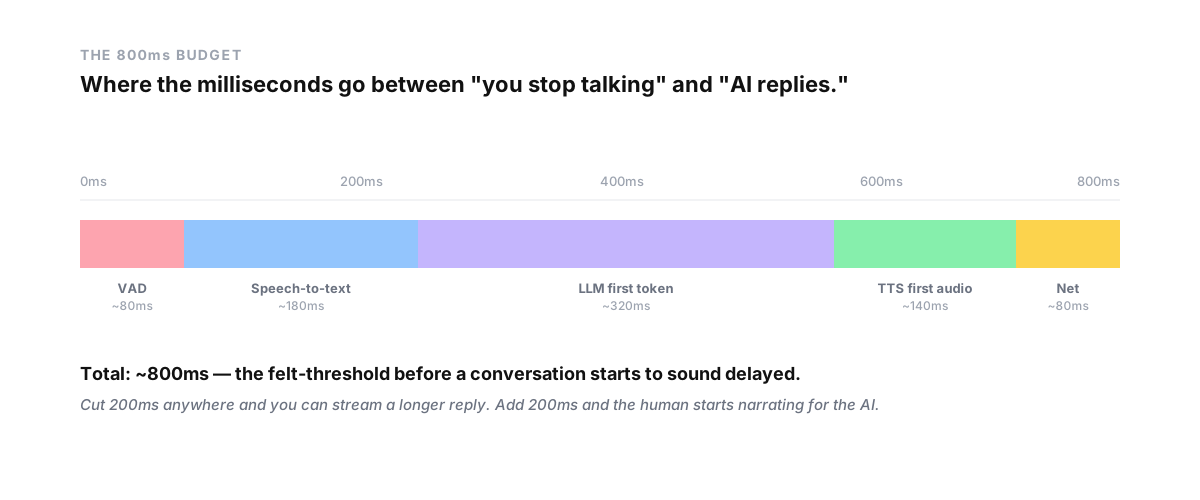
A meeting-grade voice loop runs on a budget of about 800 milliseconds round-trip — the threshold at which a human stops feeling like they are in a conversation and starts feeling like they are on a delayed satellite call. Cut 200ms anywhere and you can stream a longer reply. Add 200ms and the human starts narrating for the AI to fill the silence.
The loop has five segments — VAD, STT, LLM, TTS, network — and you budget each one.
- VAD (voice activity detection) — about 80ms. You need to know when the human finished speaking. Webrtcvad or Silero. Tune the silence threshold tightly and you get interruptions; tune it loosely and the AI talks over people.
- STT (speech-to-text) — about 180ms with streaming. Deepgram Nova-3 is the current best on price and latency. Whisper is great offline but too slow for real time. AssemblyAI Universal-Streaming is the LiveKit and Pipecat default for a reason.
- LLM first token — about 320ms. This is where most of your budget goes. Use a fast model — Claude Haiku, GPT-4o-mini, Gemini Flash. Save the smart model for the action layer, not the conversation layer. Stream tokens the moment they arrive — do not wait for the full response.
- TTS first audio — about 140ms. ElevenLabs Flash for English. Cartesia Sonic-2 for multilingual with the lowest end-to-end latency. Both stream. Both can speak the first syllable before the LLM has finished its sentence.
- Network — about 80ms round-trip on a decent connection. Cannot be eliminated. Can be made worse by routing tokens through more than one cloud region.
The orchestrator
You do not wire these five components together by hand. You use a framework that does it for you.
- Pipecat — Python, open source, designed for exactly this. The Daily team maintains it. Best documentation, best community.
- LiveKit Agents — comes bundled with LiveKit, multi-language. Pick this if you already chose LiveKit at layer 1.
- Vapi / Retell — hosted voice-AI platforms. Pick these only if you want layer 2 to be a vendor problem and you do not need to customize the loop.
- OpenAI Realtime API — speech-to-speech in a single model call. Fastest path to a prototype. Vendor lock-in is severe; you cannot swap the model. Use it for demos, not for production.
The lesson the field learned the hard way is that latency compounds. Save 50ms per layer and that is 250ms of compounded reduction across the loop. Add 50ms per layer and the call feels broken. Optimization is not a polish step — it is the product.
Layer 3: Memory
A model has no memory between calls. It has a context window, and the context window resets when the session ends. Everything that survives across calls — the AI knew what you said last Tuesday — has to live outside the model.
The shape of the memory layer matters more than the choice of database. A reasonable architecture has four kinds:
- Session memory — the running transcript and state during the current call. Goes into the LLM's context window each turn. Plain in-memory or Redis is fine.
- Episodic memory — past calls, structured. One record per meeting with summary, action items, key quotes, participants. Postgres. Indexed by participant ID and date.
- Semantic memory — vector embeddings of past conversations for retrieval. pgvector or Pinecone or Weaviate. Used to pull in the relevant three minutes of the call from six weeks ago on demand.
- Persona memory — what you want the AI to be, what tone, what goals. Goes into the system prompt each session.
The mistake everyone makes the first time is putting everything in the vector store. That gives you semantic search but it is bad at structured questions like when did we last meet? or what did we agree on? You want a hybrid layer that uses the right substrate for each kind of question.
The other mistake is letting the memory live inside a single model provider's API — Anthropic's memory tool, OpenAI's threads. If you do that, switching providers wipes your meetings. The memory layer must be yours, not the LLM vendor's.
Layer 4: Action
The easiest layer to underestimate. The AI replies in audio, the call ends — what happens next?
In a bolt-on tool, nothing automatic. In an AI-native build, the AI fires the follow-ups itself. The CRM record updates. The summary email drafts itself. The next meeting gets booked. The Slack message to the team channel goes out.
Three patterns, ranked by maturity:
- Function calling in the LLM. The model emits structured tool calls, your code executes them, results go back to the model. Native in every modern API. Use this for the simple case — one or two tools per call.
- MCP (Model Context Protocol). Anthropic's open standard for connecting LLMs to tools and data sources. Treats integrations as servers the model can discover and call. Use this when you want one integration layer that works across Claude, the OpenAI SDK, and your custom agent runtime.
- An integration aggregator like Composio, Zapier, or n8n. Use when you need 50+ third-party tools — CRMs, calendars, messengers — and do not want to write each connector yourself.
Whichever pattern, gate the AI behind an approval step for anything that costs money or is hard to undo. The AI drafts the email. The user approves before it sends. This is not paranoia — this is what makes the build shippable.
Getting the AI into the call as a participant
Two approaches. The choice changes how the product feels.
Approach A — Bot SDK. Your AI joins as a guest participant, just like a human would. Daily, LiveKit, and Agora all expose this. The bot has a name, an avatar, a video tile. It sees what other participants see; it speaks what your TTS pipeline produces.
This is the right pattern for delegating a meeting — the AI is the host, the other side is a real human, the call is a real call. The "AI is on this call" disclosure is built in because there is a visible participant.
Approach B — Server-side capture. No bot. Your software runs on the user's machine, taps system audio, processes locally. Nothing joins the call. This is the right pattern for AI assisting you in your own meeting — notes, follow-ups, mid-call coaching. Nobody on the other side sees anything.
A serious AI-native product needs both. Build delegate mode first because it has more product surface area. Then add silent-companion mode for the user's own calls.
Screen share and vision
The naive approach is to take the screen-share video stream and feed frames to a multimodal model every second. That works. It is expensive.
The right approach depends on what the screen actually is. If the user is sharing a browser tab, you can scrape the DOM and send text — orders of magnitude cheaper than vision. If they are sharing a slide deck, pull the slide images directly. If they are sharing a code editor, read the file from disk.
Reserve actual vision — Claude Sonnet image input, GPT-4o vision, Gemini Flash vision — for frames where there is no shortcut. A Figma file. A dashboard. An external app you have no API into. Sample at 0.5–1 frame per second for those. The model does not need 30fps to answer what is wrong with this chart.
The hard problems nobody puts in the demo
Latency you can engineer around. The four below you cannot.
Disclosure. The human on the other side of a delegated call needs to know they are talking to an AI. Most jurisdictions are converging on this as a legal requirement — California's bot disclosure law, the EU AI Act's chatbot transparency clause. Bake disclosure into the join flow, not the legal page. A spoken "Hi, I'm an AI agent for Harshit, I'll be running our chat today" at the top of the call is correct.
Consent. Recording is separately regulated. Two-party consent states require explicit opt-in from every participant. Build this as a UI affordance — a clear "this call will be recorded and processed by AI" with an accept or decline before the call starts.
Sovereignty. Your call audio is some of the most sensitive data your product produces. Treat it that way. Run PII masking on the transcript before it leaves the device. Keep the memory layer on the user's machine when feasible. Let users bring their own model API key, so the LLM provider sees only what is allowed through and the user is not double-paying for tokens they already buy.
Multilingual. If you want to ship globally, build for multilingual from day one. Deepgram and Cartesia both handle code-switching mid-sentence. Pick TTS voices that exist across the languages you ship. Do not bolt on language packs later; rebuild the loop.
A reference stack
For a team starting in 2026 and shipping in three months — concrete picks, no hedging:
- Media — Daily.co
- Voice orchestration — Pipecat
- STT — Deepgram Nova-3
- LLM (conversation) — Claude Haiku 4.5 or GPT-4o-mini
- LLM (action) — Claude Sonnet 4.6 or GPT-4o
- TTS — ElevenLabs Flash (English) / Cartesia Sonic-2 (multilingual)
- Memory — Postgres + pgvector
- Action — MCP + Composio
- Frontend — your existing React or Next stack with the Daily.co React hooks
This stack will ship a working AI-native video call in about six weeks of focused build before the polish work begins. Most of the second six weeks is latency optimization, disclosure design, and memory schema iteration. The third six weeks is what makes the product feel inevitable — the persistent memory that remembers Tuesday, the action layer that closes the loop without asking.
That is the build. The hard parts are not the parts most posts focus on. The parts most posts focus on are the parts the frameworks above already handle for you.
*This is part of the build-log series. The previous post, "AI-Native Meetings and Video Calls", defined what the category is. This one showed how to build it. The next one in the series is on the memory layer — what we learned shipping ours.*